
PickMyTray
PICK MY TRAY
A simpler way for guests to request tray pickup.
Instead of leaving used trays in the corridor, guests scan a QR code or tap an NFC tag near the room to request collection from their phone. Apgile sends the room location and pickup details to the responsible team—no app download required..
PICK MY TRAY
A simpler way for guests to request tray pickup.
Instead of leaving used trays in the corridor, guests scan a QR code or tap an NFC tag near the room to request collection from their phone. Apgile sends the room location and pickup details to the responsible team—no app download required..
Keep corridors guest-ready without relying only on collection rounds
Guests do not always know whom to call when a tray is ready for collection. Routine pickup rounds may not match the moment each guest finishes their meal. Pick My Tray gives the guest a direct way to notify the responsible team.
Cleaner corridors
Help reduce the time used room-service trays remain visible outside guest rooms.
Fewer front-desk calls
Give guests a dedicated pickup action instead of requiring them to find and call the appropriate department.
Room identified automatically
The QR code or NFC tag is associated with the room, so the guest does not need to explain the pickup location.
Clear staff visibility
Send the pickup request and room location together so the responsible team can acknowledge and complete it.
Scan or tap
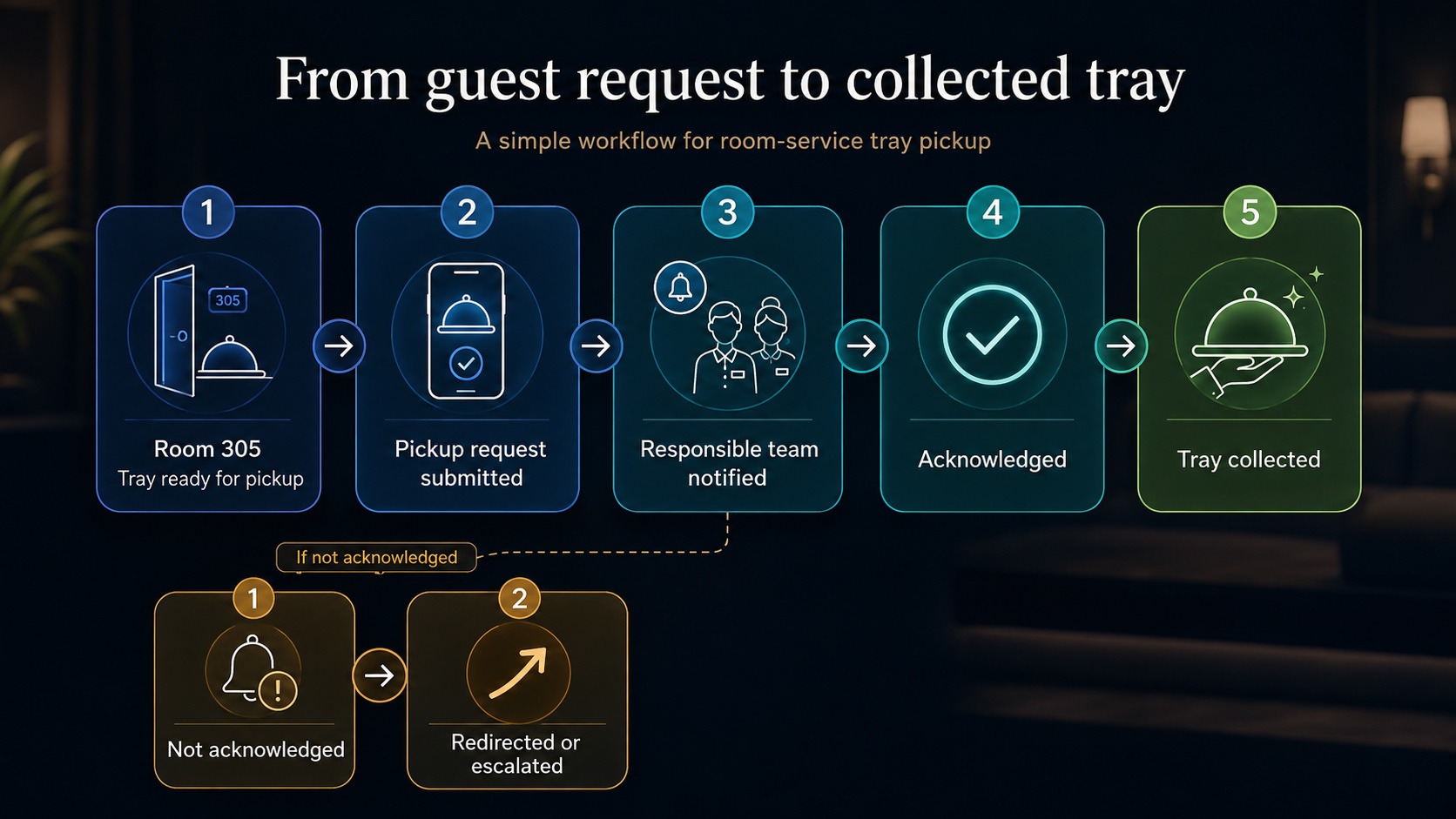
The guest scans the room’s QR code or taps its NFC tag when the tray is ready for collection.
Request pickup
A simple guest-facing page opens with the option to request room-service tray pickup.
Notify the responsible team
Apgile sends the pickup request, room location, submission time, and any guest-provided details to the configured team.
Track to completion
The request remains visible while it is acknowledged and completed. Unattended requests can follow the property’s escalation workflow.
A focused workflow that fits hotel operations
Guest-initiated pickup
Guests can request collection at the moment the tray is ready.
Location included
The responsible team receives the room associated with the access point.
Supported staff devices
Requests can be managed through supported phones, tablets, or computers, with smartwatch notifications available where useful.
Management visibility
When tray pickup is configured as a service item, its activity can be reviewed using the dashboard’s available status, location, staff, and date controls.
Pick My Tray questions
No. The tray-pickup page opens in the guest’s browser after scanning the QR code or tapping the NFC tag.
Each QR code or NFC tag is associated with its room or configured service location. That location is included when the guest submits the pickup request.
The request is routed to the staff member or operational team configured to manage room-service tray collection.
No. Supported phones, tablets, or computers can be used. Smartwatches are optional.
The request can remain visible, be redirected, or follow the escalation process configured for the property.